cookieOption={We use cookies to personalize content and ads, to provide social media features and to analyze our traffic. We also share information about the use of our site by you with social media, advertising, and analytics that may combine it with other information you provide or which they have collected from your use of their service} STAR VILLAGE GROUP SOFTWARE: OFFICE
English French German Spain Italian Dutch Russian Portuguese Japanese Korean Arabic Chinese Simplified

English French German Spain Italian Dutch Russian Portuguese Japanese Korean Arabic Chinese Simplified

Showing posts with label OFFICE. Show all posts

Thursday, December 8, 2016

Office Suite 2017 Home Student and Business by Apache OpenOfficeTM for PC

|0 komentar
Are you looking for an alternative to Microsoft Office? Then the Office Suite package is just the thing for you!

Office Suite covers any and all primary functions an individual at university, at work or in school might need during daily PC activities.
Be it word processing, spreadsheet analysis or creating a presentation, Office offers many different uses, all while beingfully compatible with Microsoft Office Word, Excel and PowerPoint.

Everything important at one glance:
• English version of Office Suite
• Over 1,000 different fonts for every occasion
• 20,000 clipart images
• Optimum alternative to Microsoft Office
• Improved performance
• Quick and easy installation
• Great price-performance ratio
• Easy to navigate
• Fast delivery

The OpenOffice package is a program for everything. Regardless of whether you're writing a paper for university, working on a presentation for your co-workers or are about to write a term paper in school.

Writer: Word processing for easy writing and text layout
Calc: Spreadsheet analysis for calculations, formulas and breakdowns
Draw: Vector-based drawing program to create graphics
Impress: Software for stylish presentations
Base: Database to manage large amounts of data
Math: Editor for mathematic formulas

System requirements:

Windows 10, 8.1, 8, 7, XP (32 Bit/64 Bit)
Special Features:  Productivity Hacks
This package also includes documentation as to how to increase your productivity titled:
• 8 Habits of Highly Productive People
• Office Productivity Hacks

Sunday, July 8, 2012

Office for Mac 2011

|0 komentar
Office for Mac 2011 Home & Student -Family Pack

Product Features

  • Office for Mac Home and Student 2011 Family Pack includes Mac versions of Word 2011, Excel 2011, and PowerPoint 2011;
  • The most familiar and trusted productivity applications used around the world at home, school, and business.
  • Reliable compatibility with the over 1 billion Macs and PCs running Office worldwide ensures you have the right tools to create, share.
  • And collaborate with virtually anyone, anywhere, with no worries.
  • Office for Mac 2011 offers top-of-the-line software with the most complete feature set
  • And Remote Desktop for Mac 2 so you can drive your Windows-based PC from your Mac.
  • Share Office documents from where you want with nearly any computer with a browser;


Product Details


    Product Description

    Amazon.com Product Description

    With over 1 billion PCs and Macs running Office, Microsoft Office is the most-trusted and most-used productivity suite ever. And Office for Mac 2011 is here to help you do more with your Mac your way. Use familiar applications like Word, Excel, and PowerPoint to help you take your ideas further. And since Office for Mac is compatible with Office for Windows, you can work on documents with virtually anyone on a Mac or PC. Store your files in a password protected online SkyDrive folder to access, edit, or share your work from virtually anywhere with the free Office Web Apps.

    Family Pack Version

    Licensed for home and student use on three (3) Macs per household; not for use in any commercial, non-profit, or revenue generating business activities, or by any government organization.

    What's New and Improved

    Word for Mac 2011   
    Powerful writing tools help you create outstanding documents, then store, edit, and share your work easily on the web.
    Excel for Mac 2011   
    Clarify your financial picture with easy-to-analyze spreadsheets you can post online to view, edit, share, or coauthor with your team from virtually anywhere.
    PowerPoint for Mac 2011   
    Create powerful, professional presentations that engage and inspire your audience, and present online as effectively as in person.
    • Ribbon
      Access favorite commands quickly, and personalize your workspace.

    • Office Web Apps*
      Post, edit, and share files from virtually anywhere.

    • Coauthoring
      Simultaneously edit a file with authors in multiple locations.

    • Template Gallery
      Visually select the perfect template for your next project.

    • Photo Editing
      Remove backgrounds or add color filters right within PowerPoint.

    • Full Screen View
      Use full screen to maximize space for reading and writing.

    • Presentation Broadcast
      Broadcast a presentation instantly online, even to people without PowerPoint.

    • Improved Publishing Layout View
      Create visually rich newsletters, brochures, and documents easily.

    • Sparklines
      Create small charts in a single cell to discover patterns in your data.

    • Visual Basic Support
      Automate repetitive tasks by programming your favorite commands.

    • Dynamic Reordering
      Rearrange layers of text, photos, and graphics quickly.
    * Requires a Windows Live ID, internet connection and supported browser.

    Work the way you want, where you want.

    Microsoft Office for Mac adds rich new features to the familiar Office applications you already know, helping you to manage your home and schoolwork the way you want. Microsoft Office for Mac Home and Student 2011 Family Pack is licensed for home and student use on three (3) Macs per household and is not intended for commercial use. It includes:
    Word for Mac 2011
    Powerful writing tools help you create outstanding documents, then store, edit, and share your work easily on the web.
    • Create visually rich newsletters, brochures, and documents in Publishing Layout view.
    • Instantly see styles applied in your document with Visual Styles.
    • Work in Full Screen view to maximize space for reading and writing documents.
    • Rearrange layers of text, photos, and graphics quickly with Dynamic Reordering.
    • View, edit, store, and share documents online with the Word Web App on Windows Live SkyDrive.*
    • Share and coauthor Word documents with virtually anyone, whether they're using Office on a Mac or PC.
    Excel for Mac 2011
    Clarify your financial picture with easy-to-analyze spreadsheets you can post online to view, edit, share, or coauthor with your team from virtually anywhere.
    • Clarify your data using Conditional Formatting with icons, data bars, and color scales.
    • Spot trends with new Sparklines, small charts that fit in a single cell.
    • Spend more time analyzing data and less time sifting through it with PivotTables.
    • Organize, filter, and format related data with Excel tables.
    • Increase efficiency and save time by automating repetitive tasks using Visual Basic.
    • View, edit, store, and share spreadsheets online with the Excel Web App on Windows Live SkyDrive.*
    • Share and coauthor Excel spreadsheets with virtually anyone, whether they're using Office on a Mac or PC.
    PowerPoint for Mac 2011
    Create powerful, professional presentations that engage and inspire your audience, and present online as effectively as in person.
    • Remove backgrounds or add color filters to your photos right within PowerPoint.
    • Move beyond the conference room and broadcast your presentations online.
    • Rearrange layers of text, photos, and graphics quickly with Dynamic Reordering.
    • Rehearse, check your timing, and take notes in Presenter View.
    • View, edit, store, and share Office documents online with the PowerPoint Web App on Windows Live SkyDrive.*
    • Share and coauthor PowerPoint presentations with virtually anyone, whether they're using Office on a Mac or PC.
    * Requires a Windows Live ID, internet connection and supported browser.

    Product Description

    For all life’s opportunities. With over 1 billion PCs and Macs running Office, Microsoft Office is the most-trusted and most-used productivity suite ever. And Office for Mac 2011 is here to help you do more with your Mac your way. Use familiar applications like Word, Excel, and PowerPoint to help you take your ideas further. And since Office for Mac is compatible with Office for Windows, you can work on documents with virtually anyone on a Mac or PC. Store your files in a password protected online SkyDrive folder to access, edit, or share your work from virtually anywhere with the free Office Web Apps. Office for Mac Home and Student 2011 includes Word for Mac 2011, Excel for Mac 2011, and PowerPoint for Mac 2011. 


    Tuesday, July 3, 2012

    Microsoft Office Home Business 2010

    |0 komentar

    Microsoft Office Home & Business 2010 - 1 User-2 PC [Download]

    Microsoft Office Home & Business 2010 - 1 User-2 PC [Download]
    System Requirements

    • Platform:   Windows Vista / 7 / XP
    • Media: Software Download

    Product Features

    • Whether you're working from home or on the road, Microsoft Outlook 2010 helps you communicate with important contacts, manage email conversations and monitor your schedule from your PC or remotely.
    • From school fundraisers to company reports when you use Microsoft Word 2010 it all comes together efficiently. Create documents using new photo-editing features, lively text effects, then easily share them online and invite others to collaborate.
    • Saving for retirement, keeping track of tax information, tracking business expenses-all are important financial decisions. Microsoft Excel 2010 offers simple templates to help you budget and track expenses so you can focus on financial goals
    • Pressed for time on a major project? Get ideas down fast with ready-made templates, new photo- and video-editing features and eye-catching transitions all with Microsoft PowerPoint 2010.
    • Gather a wealth of business information and resources all in one spot with OneNote 2010. Post, share and edit notes with coworkers online so everyone can work at the same time with real-time updates

    Product Description

    Amazon.com Product Description

    Microsoft Office Home and Business 2010 brings together the roles of managing a business, running a household and helping with homework. Get the benefits of all the programs you need to be productive including Microsoft Outlook 2010--so you can tackle your busy day efficiently with powerful email, scheduling and social networking tools to keep your life and work in sync.
    This version of Microsoft Office Home & Business 2010 is licensed for one user to install on two PCs--a primary machine and a portable PC.

    Tackle Your Busy Day Efficiently

    Enjoy Flexibility
    Now you can easily post your Office documents online and access, share and edit them with Office Web Apps. It's an ideal way to extend your Office 2010 experience to the Web.
    Work Together
    Brainstorm ideas, share notes and work on documents with others simultaneously thanks to the new co-authoring tool in Word, PowerPoint and OneNote.
    Find It on New Backstage View
    Replaces the traditional File menu to give you one go-to spot to conveniently save, open and print documents. Customize the tab commands to fit your individual needs so you can navigate tasks effortlessly.
    Programs You Rely On
    Microsoft Office 2010 is an industry standard offering our latest, innovative tools to make your documents richer and more informative.

    Included Programs

    Enjoy the same great features you know and love with Office and get some new ones when you upgrade to Office 2010. Outlook 2010
    Whether you're working from home or on the road, Microsoft Outlook 2010 helps you communicate with important contacts, manage email conversations and monitor your schedule from your PC or remotely. Simply post documents to online folders to access and edit remotely. Get improved features including:
    • Sync multiple email accounts from services such as (Hotmail, Gmail) or just about any other provider to Outlook 2010.
    • Condense, categorize and even ignore lengthy email exchanges with a single click using Conversation View.
    • Save time with Quick Steps and customize the tasks you use the most down to a single click.
    • Share your calendar with others and access theirs, plus save frequently used groups of calendars with the new Schedule view.
    • Gain attention with your emails by using new graphic and picture-editing tools.
    Word 2010
    From school fundraisers to company reports when you use Microsoft Word 2010 it all comes together efficiently. Create documents using new photo-editing features, lively text effects, then easily share them online and invite others to collaborate. Get more new tools with Word 2010:
    • Add impact to your document with new picture-editing tools.
    • Better illustrate your ideas with diagrams by turning bullet-point lists into compelling SmartArt graphics.
    • Apply new formatting effects to your text such as shadow, bevel, glow and reflection.
    • Capture and insert screenshots directly into your document.
    • Communicate with ease in many languages with improved translation tools.
    Excel 2010
    Saving for retirement, keeping track of tax information, tracking business expenses--all are important financial decisions. Microsoft Excel 2010 offers clear insight with simple templates to help you build budgets and track expenses so you can focus on financial goals. Get more new features with Excel 2010:
    • Highlight data trends by creating data charts in a single cell with new Sparklines.
    • Find the right data quickly with new filter enhancement in PivotTable views.
    • Analyze data quickly. Highlight specific data with new and improved Conditional Formatting options.
    • Display data in a dynamic and interactive way with PivotChart views.
    • Spend less time sifting through data--use the new search filter to narrow down pertinent data to display.
    PowerPoint 2010
    Pressed for time on a major project? Get ideas down fast with ready-made templates, new photo- and video-editing features and eye-catching transitions all with Microsoft PowerPoint 2010. Get more new tools including:
    • Embed and edit video files directly in your presentation.
    • Set videos to fade in and out and apply a variety of video styles and formats.
    • Broadcast your presentation online with new Broadcast Slide Show.
    • Captivate your audience with new transitions and improved animations.
    • Use slide sections to navigate, organize and print your presentation.
    OneNote 2010
    Gather a wealth of business information and resources all in one spot with OneNote 2010. Post, share and edit notes with coworkers online so everyone can work at the same time with real-time updates. Get more new features with OneNote 2010:
    • Use quick filing to organize notebooks, ideal when you're working on multiple projects.
    • Apply styles and formatting to selected text to another paragraph with the new Format Painter.
    • See results as you type with improved Search functionality and view a prioritized list of Search results. 
    • Easily organize and jump between your notebooks with the improved notebook Navigation Bar.
    • Take notes while working in Word, PowerPoint or in Internet Explorer and automatically link them.
    Need the very best tools to grow your business?
    Step up to Microsoft Office Professional 2010 and get a comprehensive suite of tools and services to keep you organized, connected and competitive--including Access for complete data management and Publisher to create professional-quality marketing materials.

    Product Description

    Outlook 2010. Word 2010 and Excel 2010. PowerPoint 2010 and OneNote 2010. Microsoft Office Home and Business 2010 is the essential software suite for managing small businesses and working from home. Enhanced tools and features help you run your business, connect with customers, and organize your household more efficiently. Office Home and Business 2010 features new photo, video, and text effects for creating standout documents and presentations. New communication tools in Outlook 2010 help you stay in touch and organized. Office Home and Business 2010 makes it easier than ever for you to manage things in the office, at home, or in between.


    Microsoft Office Home & Student 2010

    |0 komentar
    Microsoft Office Home & Student 2010 - 3PC/1User (Disc Version)

    System Requirements

    • Platform:   Windows XP / Vista / 2003 Server / 7
    • Media: DVD-ROM
    • Item Quantity: 1

    Product Features

    • Rich and powerful new ways to deliver your work on your computer, Windows Mobile-based smart phone or a web browser
    • Easy-to-use Tools, customizable templates, color schemes, and photo-editing capabilities
    • Work with people from different places at the same time with the new co-authoring experience
    • More ways to access your files from almost anywhere, Office 2010 puts you in control of getting things done according to your schedule
    • Simplifies your tasks and creates amazing results

    Product Details

    Product Description

    Amazon.com Product Description

    With Microsoft Office Home and Student 2010, you and your kids can create great schoolwork and home projects from multi-page bibliographies to multimedia presentations. Capture ideas and set them apart with video-editing features and dynamic text effects. Then easily collaborate with classmates without being face-to-face thanks to new Web Apps tools. The results go well beyond expectations with a little inspiration, a lot of creativity and Office Home and Student 2010.

    Traditional Disc Version

    This version of Microsoft Office Home and Student 2010 includes the software on disc, with a product key. It is licensed for installation on three PCs in the same household. For customers buying a PC who need Office for their new PC only, and don't need to upgrade other home PCs, a Product Key Card provides another way to purchase Office with a PC.

    Capture Ideas and Set Them Apart

    Enjoy Flexibility
    Now you can easily post your Office documents online and access, share and edit them with Office Web Apps. It's an ideal way to extend your Office 2010 experience to the Web.
    Work Together
    Brainstorm ideas, share notes and work on documents with others simultaneously thanks to the new co-authoring tool in Word, PowerPoint and OneNote.
    Find It on New Backstage View
    Replaces the traditional File menu to give you one go-to spot to conveniently save, open and print documents. Customize the tab commands to fit your individual needs so you can navigate tasks effortlessly.
    Programs You Rely On
    Microsoft Office 2010 is an industry standard offering our latest, innovative tools to make your documents richer and more informative.

    Included Programs

    Enjoy the same great features you know and love with Office and get some new ones when you upgrade to Office 2010.
    Word 2010
    School fundraisers and neighborhood events come together efficiently when you use Word 2010. Create documents using new photo-editing features, lively text effects, then easily share them online and invite others to collaborate. Get more new features with Word 2010:
    • Add impact to your document with new picture-editing tools.
    • Better illustrate your ideas with diagrams by turning bullet-point lists into compelling SmartArt graphics.
    • Apply new formatting effects to your text such as shadow, bevel, glow and reflection.
    • Capture and insert screenshots directly into your document.
    • Communicate with ease in many languages with improved translation tools.
    Excel 2010
    Saving for retirement, changing homes, cutting expenses--all are important financial decisions. Excel® 2010 offers useful direction with simple templates to help you build budgets and track expenses so you can focus on financial goals. Get more new tools with Excel 2010:
    • Highlight data trends by creating data charts in a single cell with new Sparklines.
    • Find the right data quickly with new filter enhancement in PivotTable views.
    • Analyze data quickly. Highlight specific data with new and improved Conditional Formatting options.
    • Display data in a dynamic and interactive way with PivotChart views.
    • Spend less time sifting through data--use the new search filter to narrow down pertinent data to display.
    PowerPoint 2010
    Pressed for time on a major assignment? Get ideas down fast with ready-made templates, new photo- and video-editing features and eye-catching transitions all with Microsoft PowerPoint 2010. Get more new features including:
    • Embed and edit video files directly in your presentation.
    • Set videos to fade in and out and apply a variety of video styles and formats.
    • Broadcast your presentation online with new Broadcast Slide Show.
    • Captivate your audience with new transitions and improved animations.
    • Use slide sections to navigate, organize and print your presentation.
    OneNote 2010
    Gather a wealth of information and resources all in one spot with OneNote 2010. Post, share and edit notes for group projects online so everyone can work at the same time with real-time updates. Get more new features with OneNote 2010:
    • Use quick filing to organize notebooks, ideal when you're working on multiple projects.
    • Apply styles and formatting to selected text to another paragraph with the new Format Painter.
    • See results as you type with improved Search functionality and view a prioritized list of Search results.
    • Easily organize and jump between your notebooks with the improved notebook Navigation Bar.
    • Take notes while working in Word, PowerPoint or in Internet Explorer and automatically link them.
    Looking to stay connected?
    Step up to Microsoft Office Home and Business 2010 and you'll get another helpful program--Outlook 2010. Now you can access projects, people and plans wherever your work takes you. Use efficient new email, calendar and social networking tools to manage your world from your PC, mobile phone or online.

    Product Description

    Microsoft Office 2010 gives you powerful new tools to express your ideas, solve problems, and connect with people.  

    Thursday, March 22, 2012

    Office 2003 Menu for Office Enterprise 2010

    |0 komentar
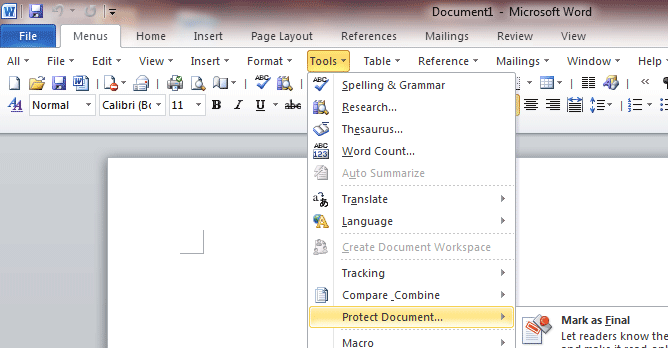
    Office 2003 Menu for Office Enterprise 2010
    Do you used to classic look and think about of workplace 2003? do not you prefer the new ribbon interface of workplace 2010? Office 2003 Menu for workplace Enterprise 2010 brings back the classic menu and toolbars of Microsoft® workplace 2003 to the ribbon of workplace 2010.

    Full options
    All new options of Microsoft workplace 2010 has been added into the classic vogue interface. Works with thirty two bit and sixty four bit editions of workplace 2010.

    All Applications Included
    Office 2003 Menu for workplace Enterprise 2010 suite includes Classic Menu for Word, Excel®, PowerPoint®, OneNote®, Outlook®, Publisher, Access®, InfoPath®, Project and Visio® 2010.

    Designed for Enterprise and Organization
    It is terribly simple to deploy the classic menus, toolbars and setting to shopper computers in enterprises and organizations. Users do not want coaching and tutorials any longer once upgrading to Microsoft workplace 2010.

    Acrobat Reader X Professional 

    Popular Posts

    Followers